Capacity planning for Jira teams
Capacity is the hours each person can really work. Load is the work planned for them. Put the two side by side, day by day, and you see who is overloaded and who is free before a date slips.
Why a team's nominal hours are not its capacity
Five people, a two-week sprint of ten working days, eight hours a day.
| Step | Hours |
|---|---|
| 5 people × 10 working days × 8 hours | 400 h |
| A public holiday in their country for two of them (2 × 1 day × 8 h) | −16 h |
| One person on approved leave for 3 days (3 × 8 h) | −24 h |
| Real capacity for the sprint | 360 h |
If the team planned 380 hours of work against the nominal 400, the sprint looked full but fine. Against the real 360 hours it is 106% loaded, and the 20 extra hours do not land evenly: they fall on the three people who are still in. A plan in story points per team hides this, because points carry no dates. A per-person plan shows it on the days it happens.
Pending leave is not taken off until it is approved; planning around it is a choice, not a guess.
Ways teams plan capacity for Jira work
A number per team and sprint
Quick to set, in story points or hours. It tells you how much a team can take on, but not which person is away on which day, so a sprint can look fine and still overload the people who are in.
A spreadsheet
Flexible and free, and out of date the day it is made: every new issue, reassignment or leave request has to be copied in by hand.
Each person, day by day, connected to Jira
Reads your issues and people from Jira, plans each person's days around their leave, holidays and working hours, and pushes the changes you approve back to Jira. This is what Mermix does.
Every person, every working day
The Capacity Heatmap shows each person's planned load, week by week, for the next twelve weeks.
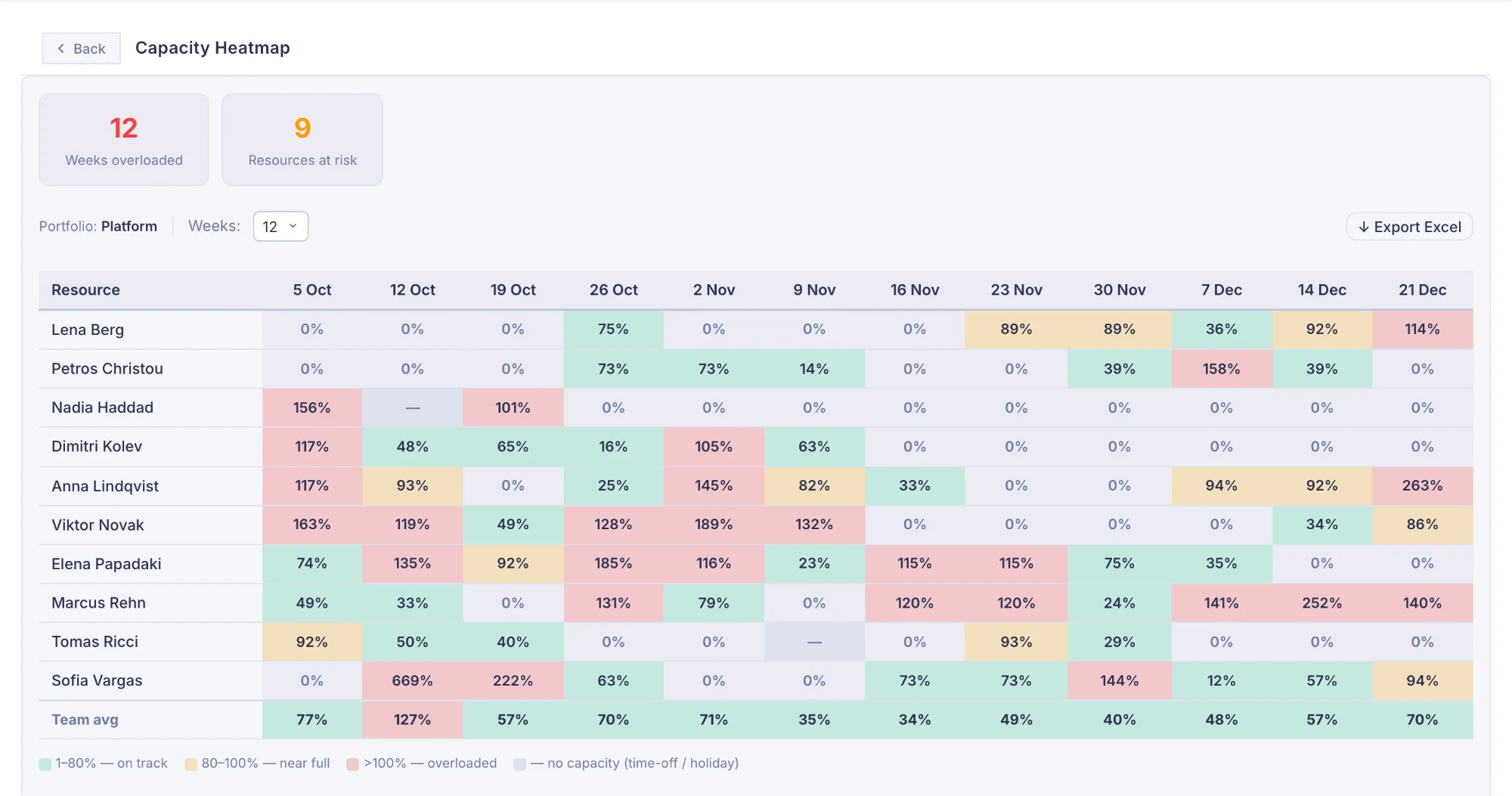
- Leave and public holidays. Import leave from a spreadsheet; public holidays come in from each person's country. Both take hours off that person's capacity.
- Shared people. Someone working for two teams shows all their work, including what another portfolio has planned for them.
- Overloads on the calendar. A task that pushes someone past a working day is marked on the calendar while there is still time to move it.
- Planned against actual. Worklogs sync from Jira, so the Utilisation Trend shows what was planned and what was done, month by month.
"Can we take on this project?"
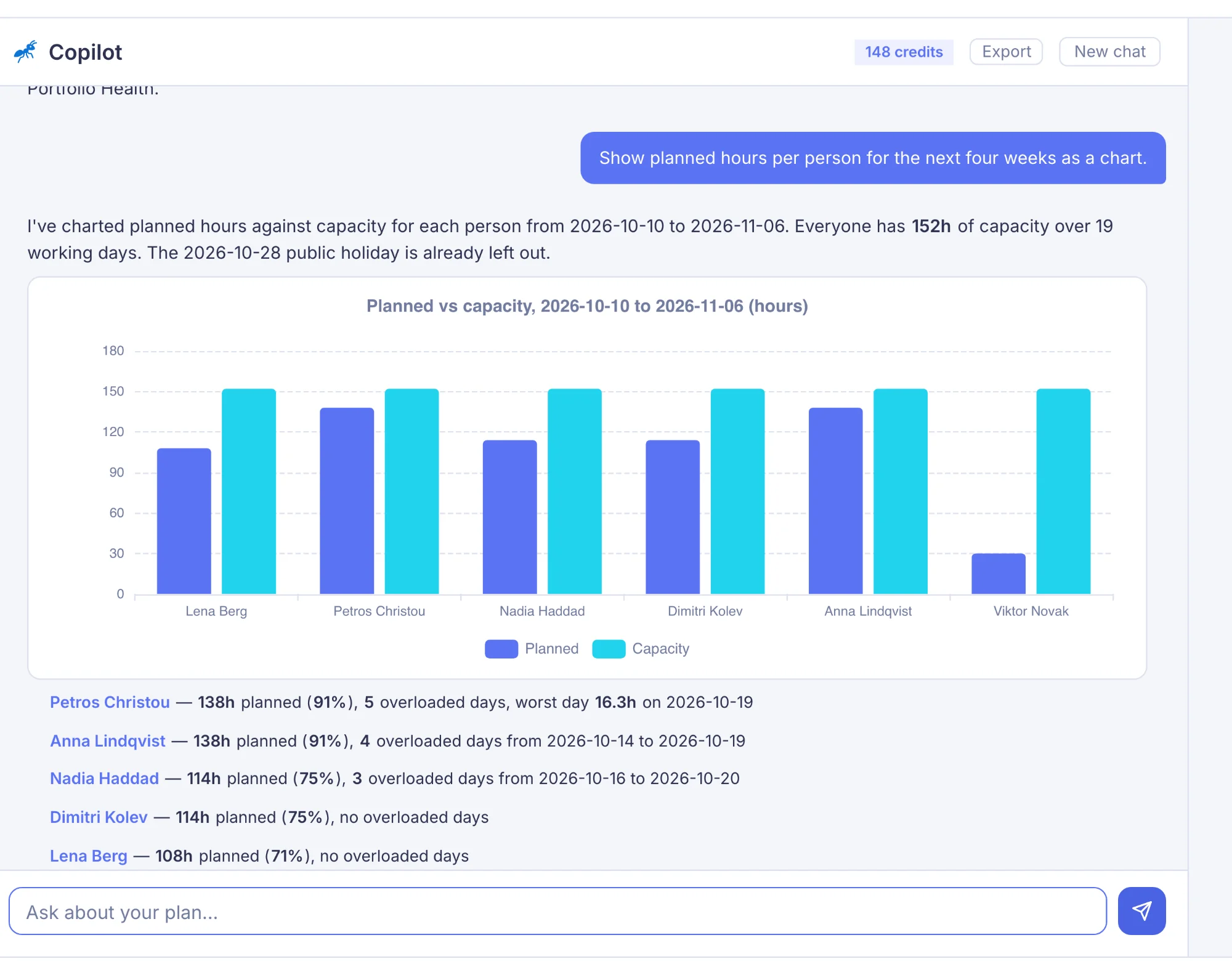
Describe new work — how many hours, how many people, when it starts and for how long — and the copilot checks it against your team's free capacity. For work already in Jira it proposes who does what and when; you approve each change before anything moves.
Jira capacity planning questions
Should I plan capacity in story points or in hours?
Story points measure the size of work for a team; they say nothing about which days a person is away. Hours let you take each person's leave and public holidays off their capacity. Mermix plans in hours, from the time estimates on your Jira issues.
How do leave and public holidays change capacity?
Each day someone is on approved leave or on a public holiday in their country is a day with no capacity. In Mermix, pending leave does not reduce capacity until it is approved, and hours planned on a leave day move to that person's other days in the task, because the work still has to be done.
When is someone overloaded?
In Mermix, a day is overloaded when the hours planned for a person go over what they can work that day: eight hours on a full-time working day, their own hours if they work part-time, none on leave or a public holiday. Overloaded days are marked on the calendar and in the Capacity Heatmap.
Does it work with Jira Free or Standard?
Yes. Mermix works with any Jira Cloud plan. You connect it with your Atlassian account and choose the projects to plan.
How is Mermix priced?
By the number of people you plan, not by Jira users. Starter is €79 a month for up to 25 resources, Team €199 for up to 100, Enterprise €499 for up to 400, with unlimited planners, projects and portfolios.
More on Jira resource planning, or see pricing.