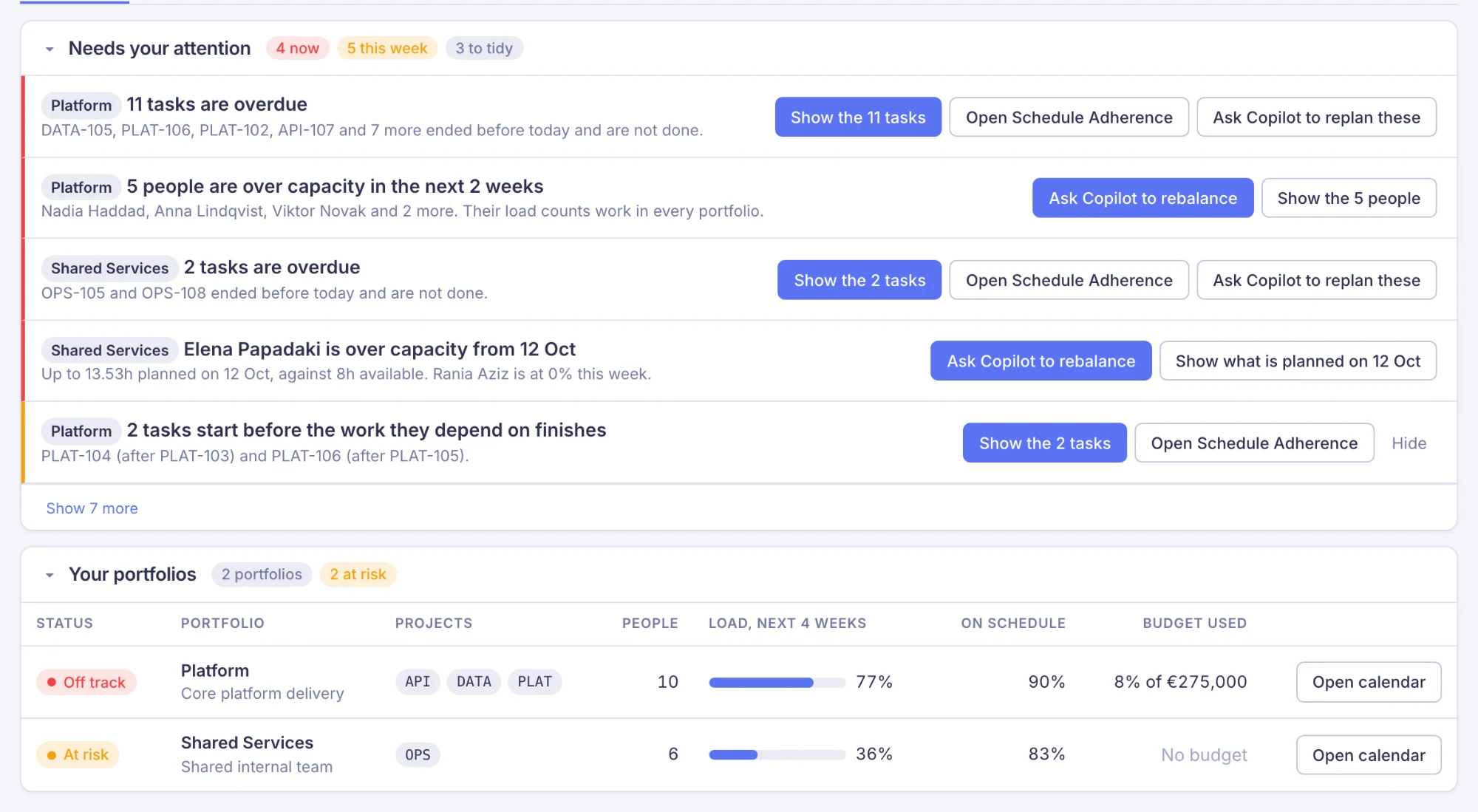
Everything you need to plan your people
One calendar of your whole team built from your Jira issues, real capacity around leave and public holidays, a copilot that proposes changes you approve, and reports from capacity to profitability.
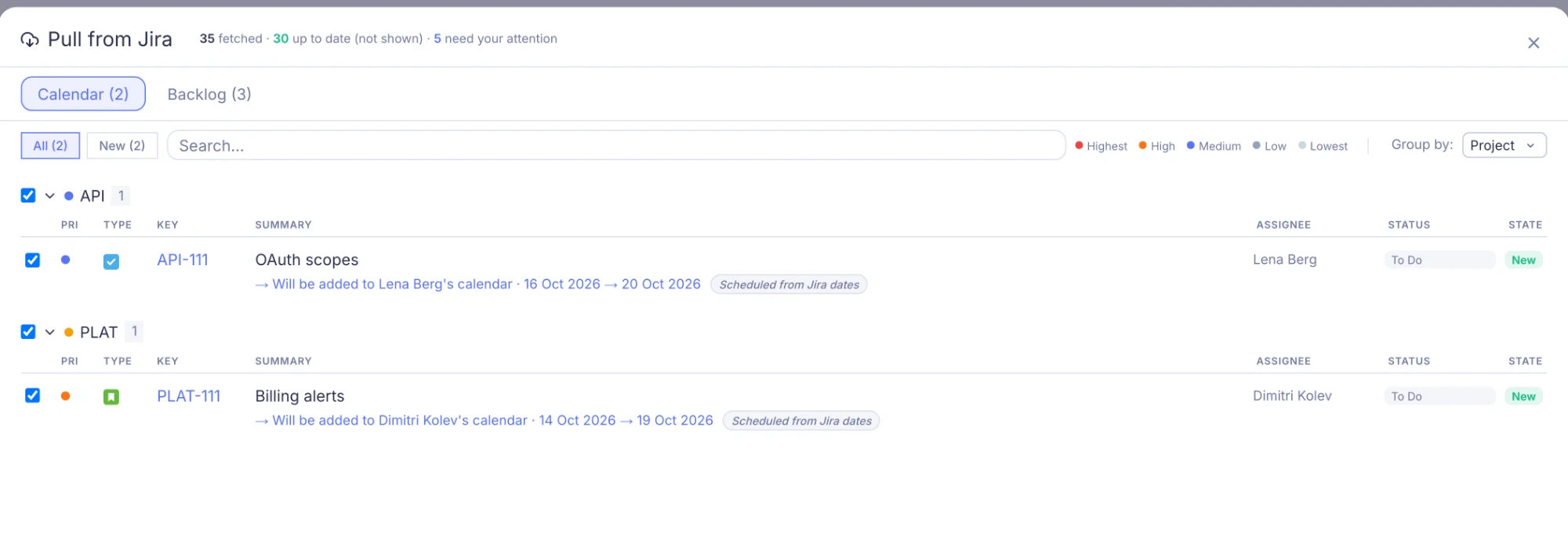
Pull from Jira. Review before you import.
Fetch assigned issues and backlog items from Jira Cloud. Issues are grouped by status category and project — review diffs, pick what matters, skip the rest.
A complete picture on every pull
Each pull reads every open issue of the projects you choose and compares it with your plan. You see only what is new or changed, so nothing is missed because of when it was last edited.
Re-sync without losing your planning decisions
Made local changes and then synced again from Jira? Your edits are preserved. Mermix only overwrites a field when Jira confirms the change you pushed already landed.
Done issues kept in sync
When a Jira issue moves to "Done", your next pull marks it complete on the calendar and removes it from the backlog — no manual action needed.
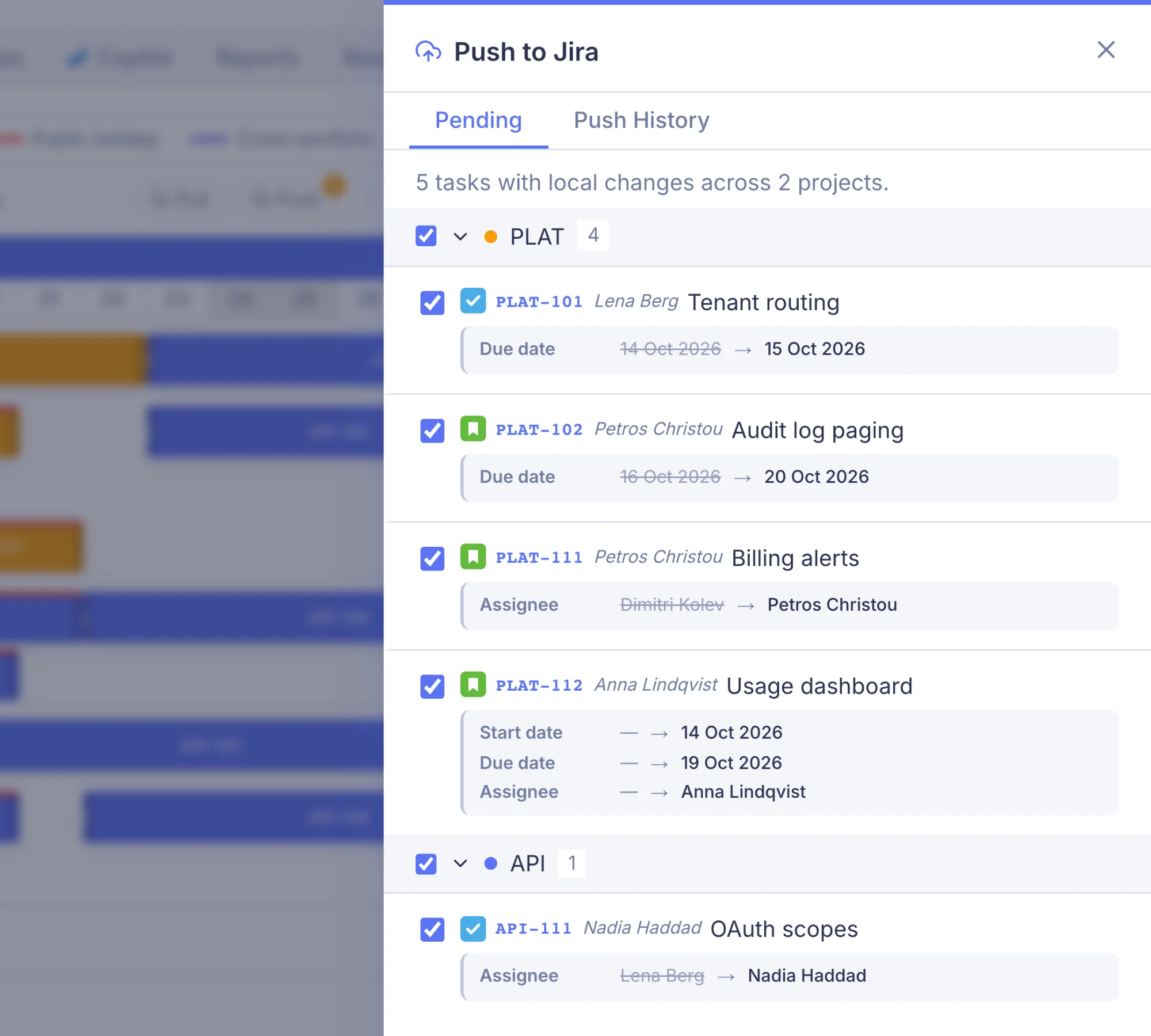
Push your plan back. Jira stays in sync.
After planning on the calendar, push date changes, reassignments, and effort updates back to Jira — selectively. Review every field change before it goes out.
Selective push — review before sending
Changes to dates, assignees, and estimates are tracked locally. The push drawer shows a diff of every pending change. Select what to push; leave the rest.
Checked with Jira before it goes
When you open the push drawer, Mermix asks Jira what the connected account may change in each project. A change Jira would refuse is unticked, with the reason, instead of failing halfway. If Jira still refuses something, you see the reason in the words Jira used, and the task stays pending.
Worklog sync — planned vs actual from Jira
Incrementally sync time logs from Jira into Mermix. Actual hours feed the Hours reports, Utilisation Trend and Project Profitability — no manual data entry.
 AI copilot
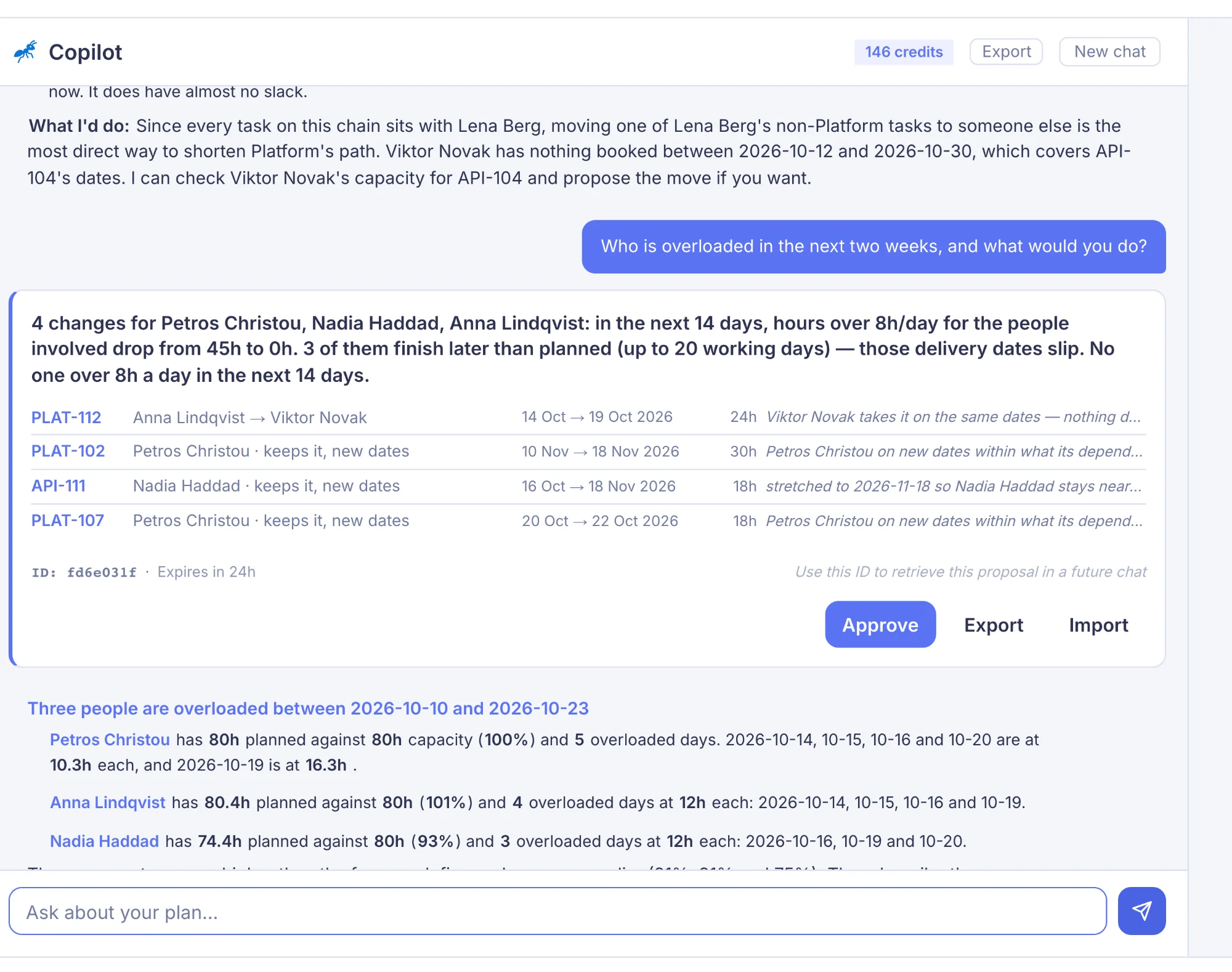
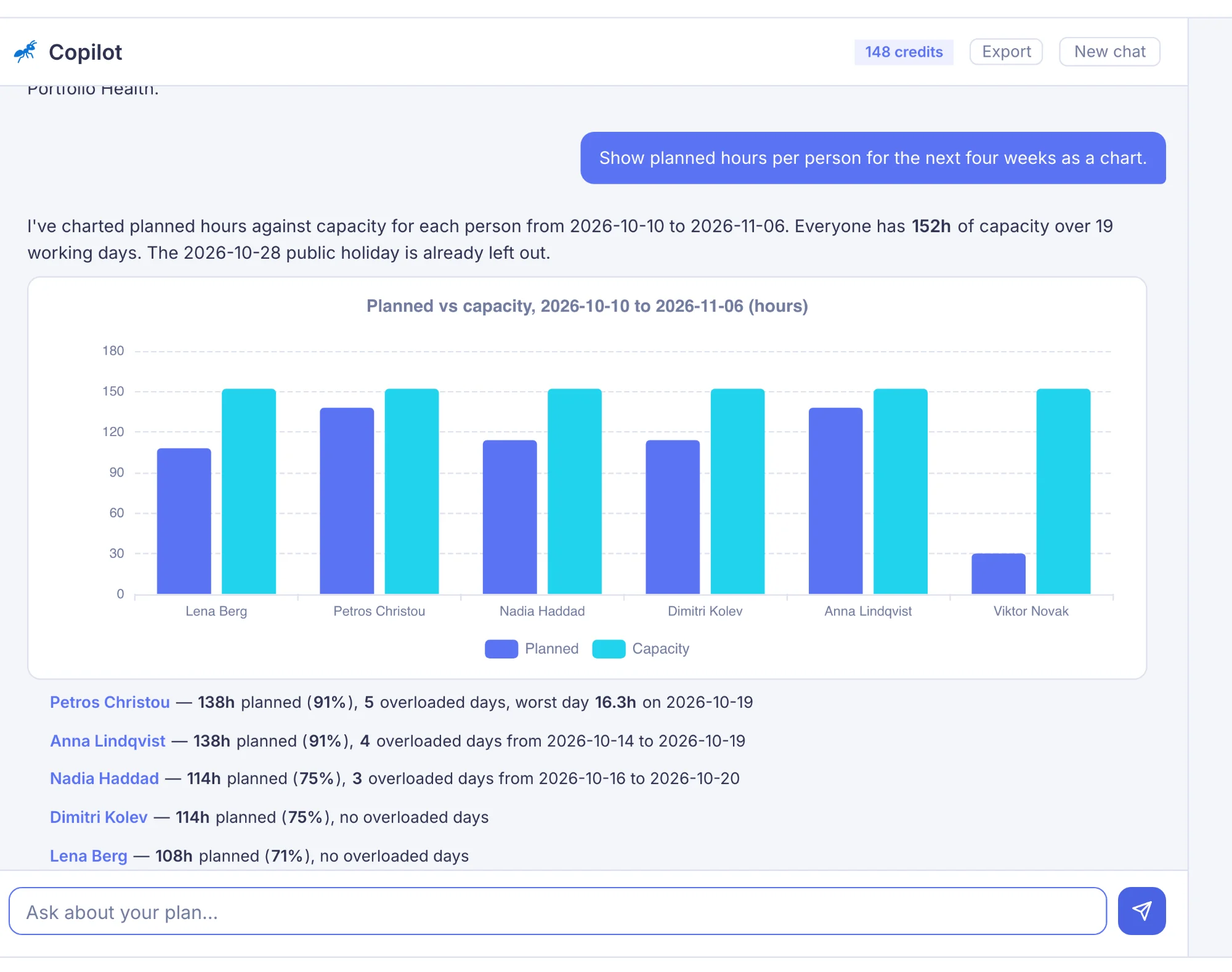
Answers that span screens. Nothing changes until you approve.
The copilot has full context — assignments, capacity, worklogs, leave, holidays, backlogs — and goes beyond single tools. It runs multi-step plans, builds proposals, and hands them back for approval.
| How it decides | From each person's real capacity — leave, their country's public holidays and work in other portfolios — and the dependencies between tasks. It shows what a change costs, from each person's own rate, and which delivery dates move. When no plan fits, it picks the least-bad option and says what it had to accept. When the data is too thin, it says so instead of guessing. It never ranks or judges people. Nothing changes until you approve, and a single approved change can be undone. |
| Agentic skills | Health check of the plan · auto-schedule the backlog (dependency-aware) · compare options side by side · rebalance an overloaded person · what-if scenarios (leave, removed people, added work, a tighter deadline) · completion forecast from real delivery pace · capacity check for new work · executive briefing · what changed since a date. Proposals persist 24h, preview as full Gantt overlay, import/export Excel, accept or refine in chat. |
| Analysis tools | Resource load, capacity gaps, overallocation detection, project summary, backlog breakdown, worklog queries, time-off lookup, task search, sprint data, critical path with float in working days |
| Scheduling actions | Move task, reassign, schedule from backlog, unschedule, update effort — each shown as a preview card, nothing runs without approval |
| Charts | Bar, line, doughnut, pie, heatmap, gauge, radar — rendered inline via Apache ECharts |
| Exports | Multi-sheet Excel files generated in chat. Branded PDF export of the full conversation with charts preserved as images. |
| AI model | Runs on a leading AI model from Anthropic. The same model on every plan — we pick the one that gives the best planning answers and keep it up to date. |
| Credits | One credit per message. Monthly allowance included with every plan (150 / 450 / 800). Top-up packs available. Deducted only on success. |
| Role-aware | Admins and Planners get full tools. Board members get read-only analysis and worklog sync. The copilot adapts automatically. |
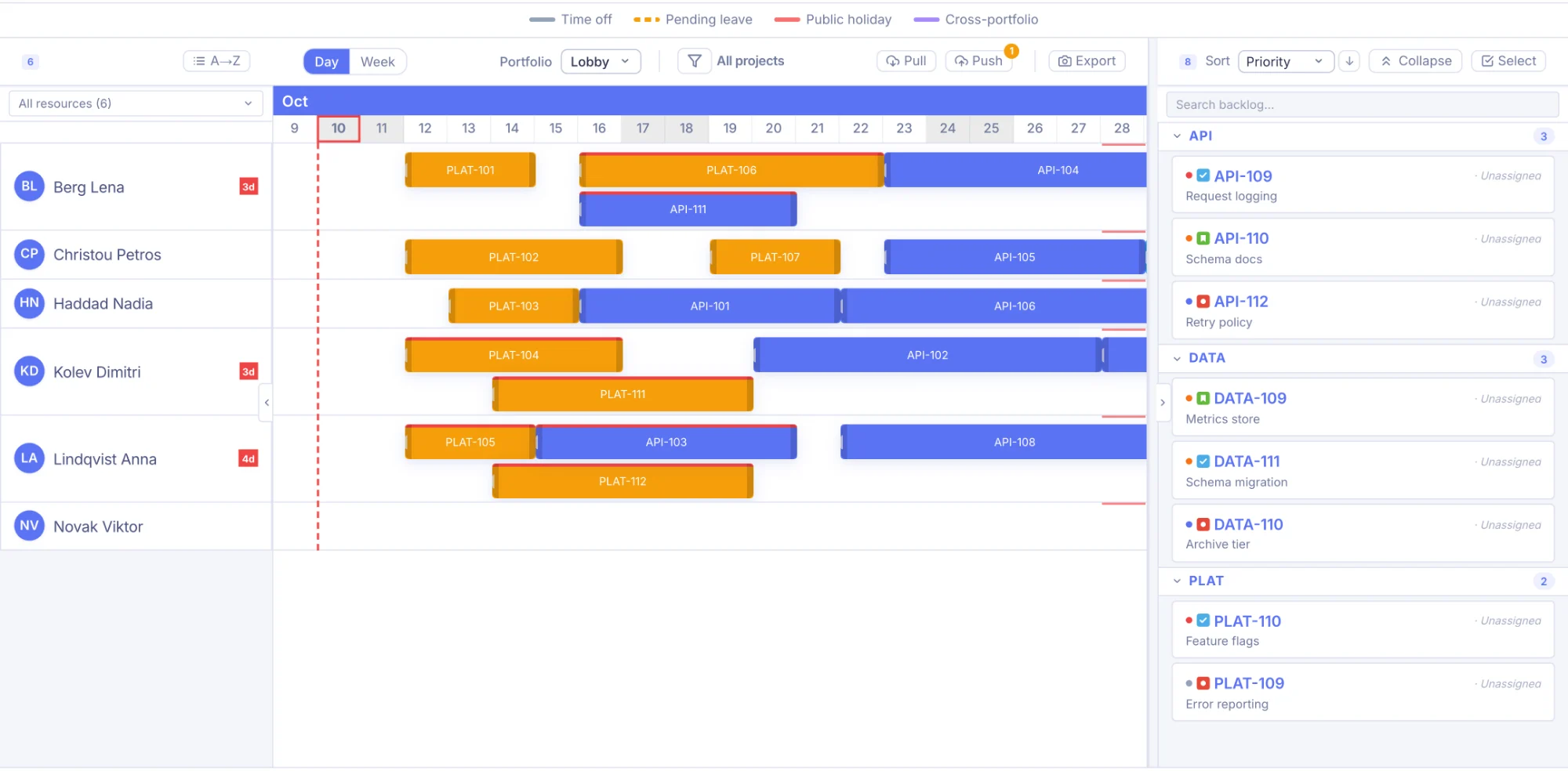
A calendar built for resource planning, not just events.
See your whole team's schedule at a glance. Drag tasks on the calendar or drop them straight from the backlog. Each resource shows their country's public holidays and approved leave inline — so you never schedule someone during a bank holiday in another country. More on Jira resource planning with Mermix.
Drag, resize, reassign — or drop from backlog
Move tasks between days or between resources with a single drag. Resize bars to change dates. Drop a backlog card onto any row to schedule it instantly. Keyboard shortcuts for nudge, unschedule, and undo.
Multi-country holiday awareness
Each resource has a country code. Mermix fetches that country's public holidays and renders them as stripes on the calendar — so a Greek holiday shows on Elena's row, not on Marcus's in Germany.
Overallocation indicators
A red stripe on any task bar warns you when a resource is overbooked on that day. Catch scheduling conflicts before they become delivery problems.
Time-off & leave stripes
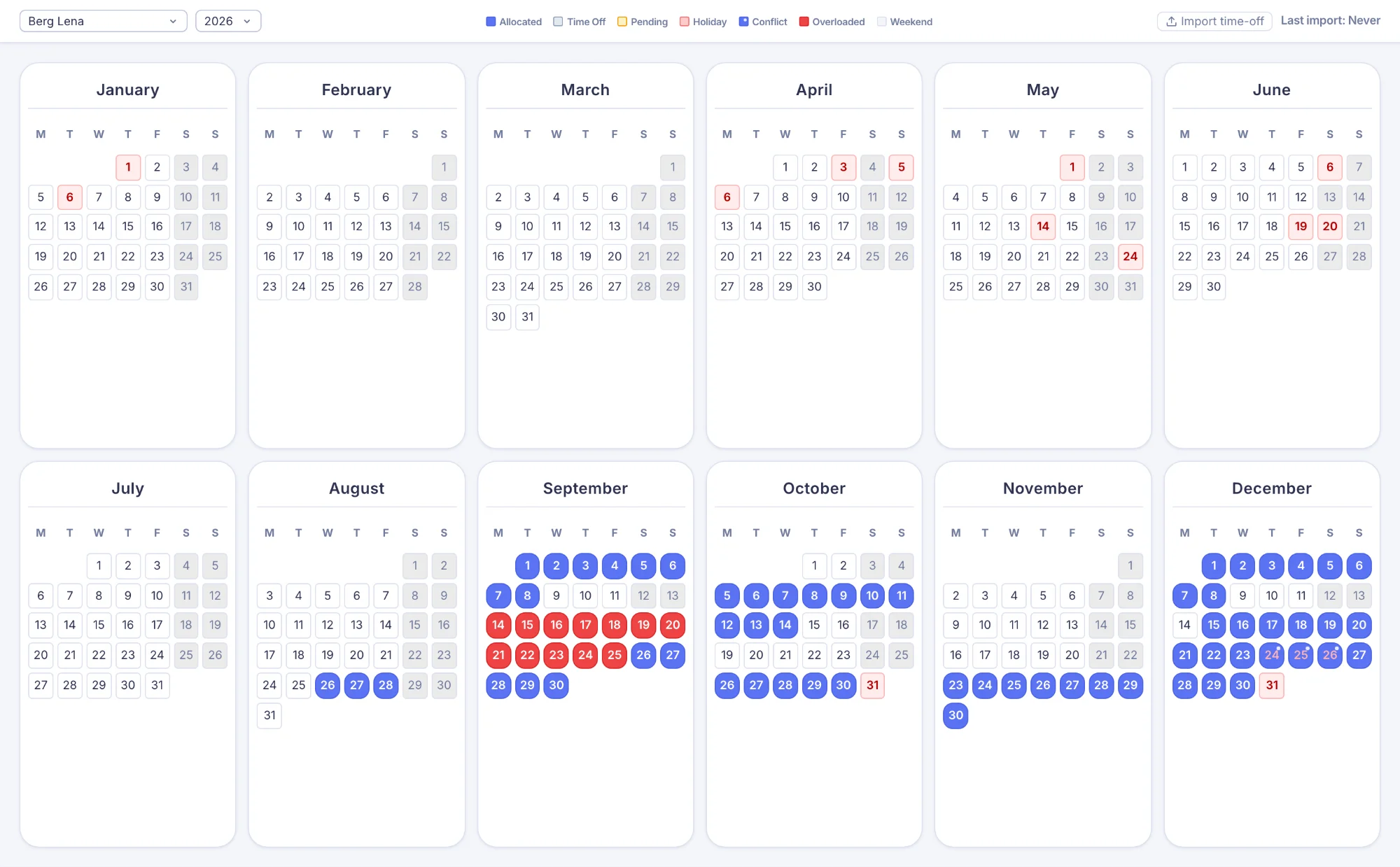
Approved leave shows as grey stripes, pending requests as dashed amber. You see each person's availability before you schedule — no surprises.
Day / Week zoom
Toggle between day-level precision and a compressed week view for big-picture planning. Bars, stripes, drag, and resize all adapt automatically.
Project & resource filters
Filter the calendar by project — unselected projects fade to ghost bars. Filter or sort resources by name. Focus on what matters right now.
Configurable visible period
Choose how many months before and after today to show. See a tight 2-month window or a wide 6-month horizon — your call.
Portfolio workspaces
Each portfolio scopes the calendar to its own projects, resources, and users. Planners see their team. Admins switch between portfolios or view everything at once. Cross-portfolio allocations appear as capacity overlays — so you always see a resource's full workload, even when some tasks belong to another team.
Sprint markers & project colours
Vertical sprint lines align scheduling with sprint boundaries. Per-project colour coding makes it easy to spot which work belongs where across a busy calendar.
Redistribute allocations
When someone leaves or is overloaded, open the redistribute modal — pick their tasks on the left, assign recipients on the right. Partial transfers supported. All moves are marked for Jira push.
Who's doing what, pictures & resource calendar
Export a one-page Who's doing what (PDF or Excel): each person's load week by week, what they're on now and next, and who is off. Or export the calendar itself as a PDF, SVG or PNG for any period. The resource calendar gives each team member a personal year-at-a-glance view of their tasks, leave, and holidays.
See what blocks what — across people and projects.
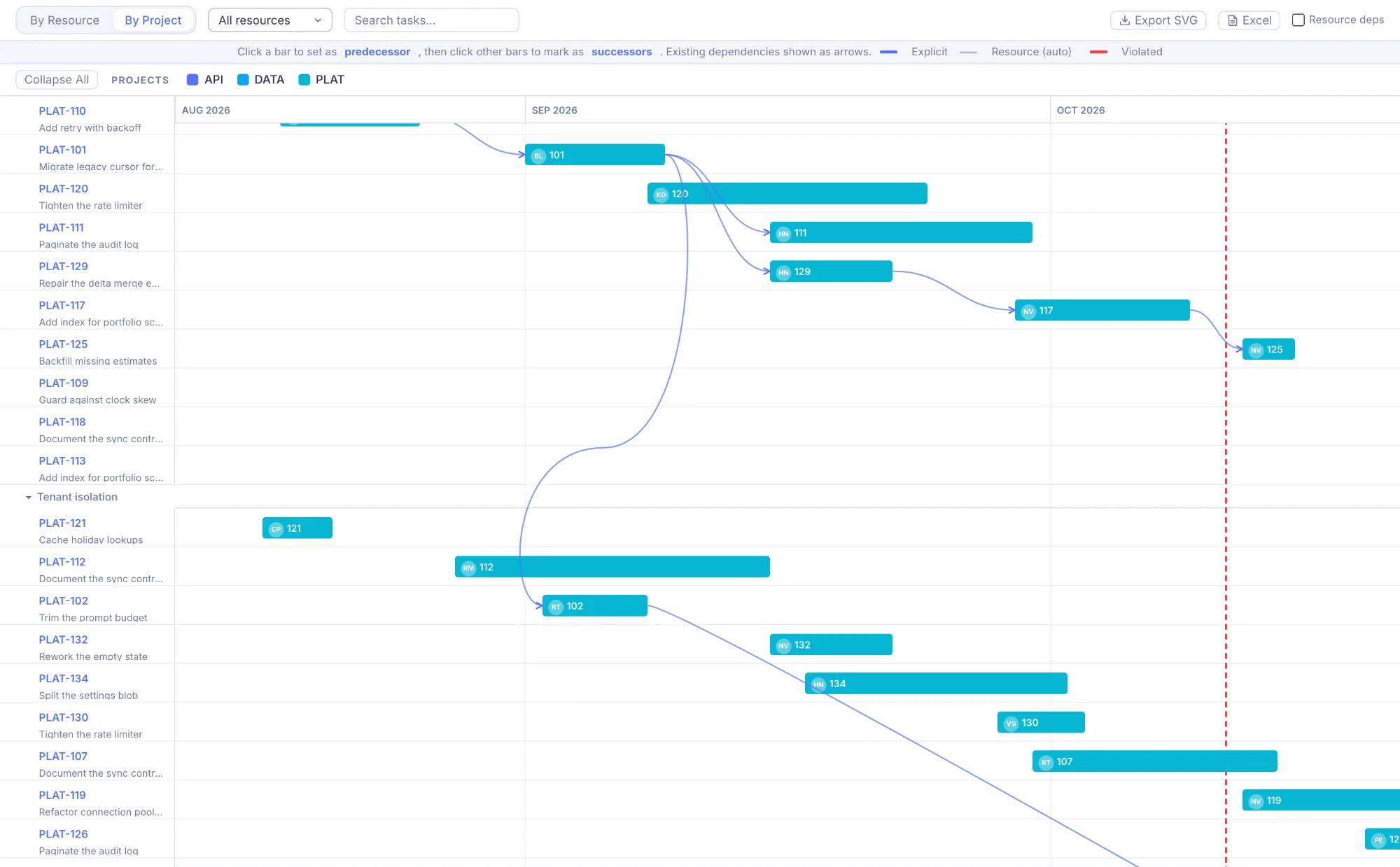
Open the full-screen Dependency Gantt to visualise task relationships across your entire team. Click any task to select it as a predecessor, click another to link them — arrows draw instantly, and the link is saved in Jira as a "blocks" link. Links your team adds in Jira show up here too. Mermix also shows the order of each person's work as implicit dependencies.
Interactive Gantt with bezier arrows
A full-screen Gantt overlay grouped by resource or project. Explicit dependencies draw as accent arrows, implicit (resource-order) ones as grey. Violated constraints turn red — catch sequencing problems before the sprint starts.
Click-to-link creation
Click a task to select it as predecessor, click another to add it as successor. Each link is saved in Jira at once as a "blocks" link (the successor starts after the predecessor finishes), so your team sees it where they work. Cycle detection prevents impossible graphs.
Implicit resource dependencies
When one person has tasks in sequence, Mermix shows the order of their work as grey links, and the copilot counts it in the critical path. They stay in Mermix: nothing is written to Jira.
Task modal integration
Every task's modal has a Dependencies tab showing its predecessors and successors with status badges — OK, Violated, Done, or Orphaned. Add or remove links without leaving the modal; each change is saved in Jira.
Export as PDF, SVG or PNG
Export the dependency chart — arrows, bars and group headers — for the period you choose. PDF and SVG stay sharp at any size; share them in presentations, Confluence pages or status reports.
Plan around real availability, not just headcount.
Every capacity calculation in Mermix accounts for each person’s working days and hours, public holidays, and approved leave. No more accidentally scheduling someone during a bank holiday in a different country.
Per-resource country holidays
Each resource has an ISO country code. Mermix fetches public holidays for that country and renders them as stripes on the calendar — visible before you schedule.
Time-off import (XLSX / CSV)
Import leave from any HR system — upload an XLSX or CSV, map columns, preview matches, and import. Approved leave shows as a solid grey stripe; pending as dashed amber.
Part-time working patterns
Set each person’s working days and hours, with the date they start. Capacity, overload and scheduling follow them. How working patterns work.
Working-days-aware effort
Planned effort is proportionally distributed across working days only. Reports and heatmaps exclude weekends and holidays automatically — no manual adjustments.
12 reports across 4 dashboards — for every layer of the organisation
From the one-click Executive Report for weekly PMO sessions to worklog-level detail with Cost, Revenue, and Margin on every entry. Most reports export to Excel with one click; the Executive Report exports as a branded PDF for board decks.
Portfolio Health
Executive Report
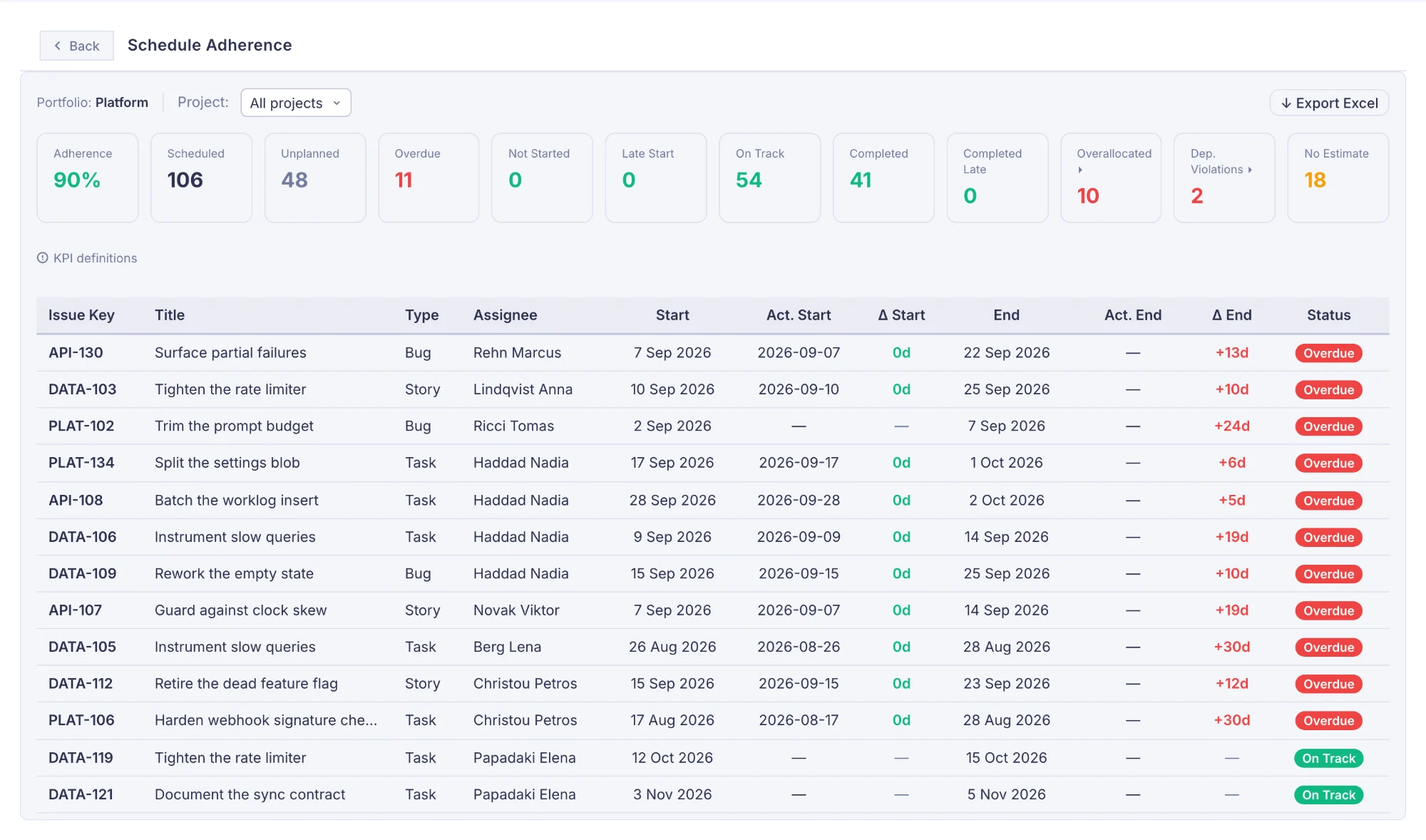
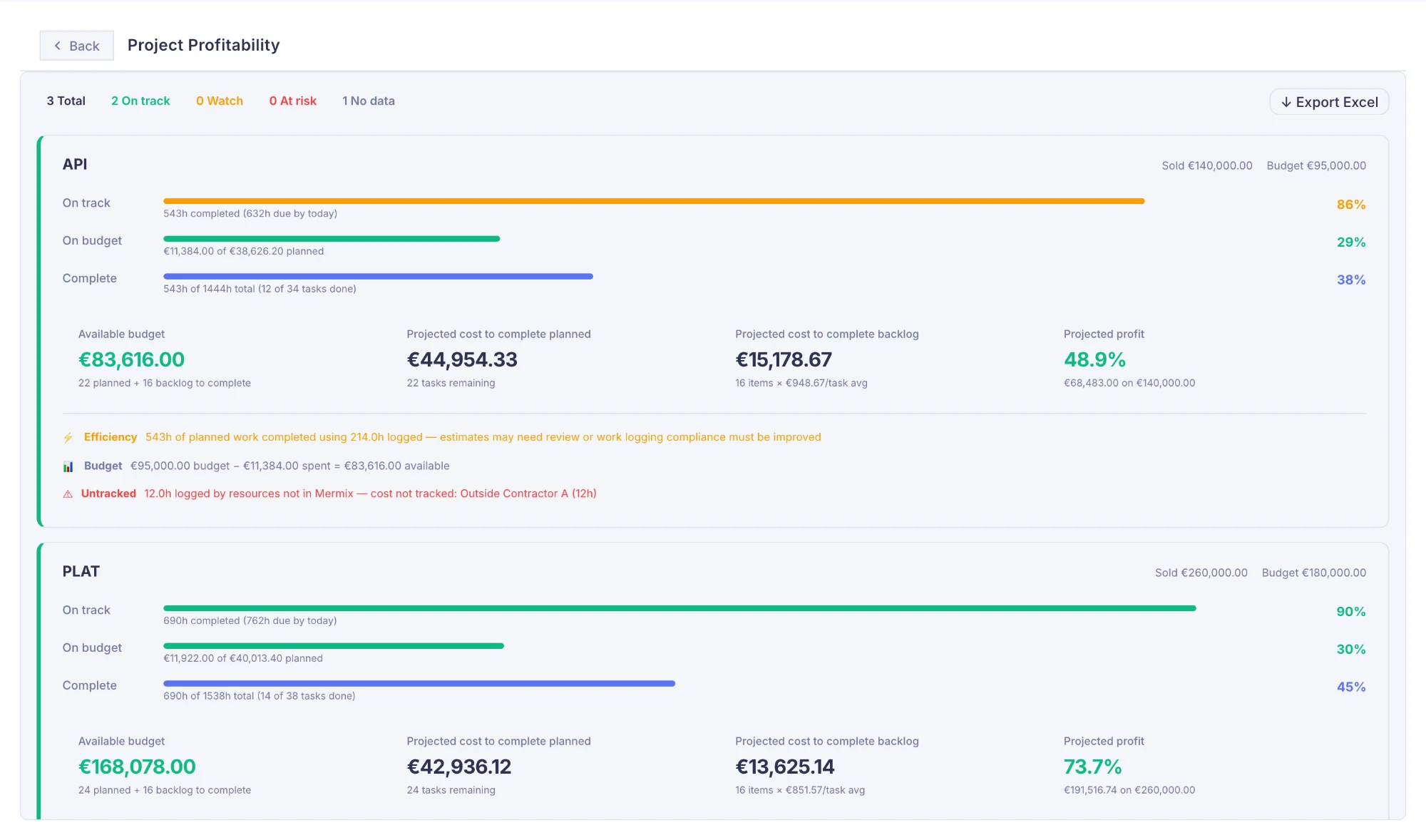
Weekly PMO artifact in one click — executive summary, 12-KPI schedule grid, per-project P&L, what changed this week, next 4 weeks forward look. Branded PDF export for board decks and stakeholder emails.
Project Profitability
Per-project P&L — actual cost from worklogs, remaining scheduled cost, projected margin against the contract sold value. Spot losing projects before they ship.
Schedule Adherence
12 schedule health KPIs with sortable task-level detail and working-day variances. Spot overdue, delayed, and overallocated work at a glance.
Capacity & Resources
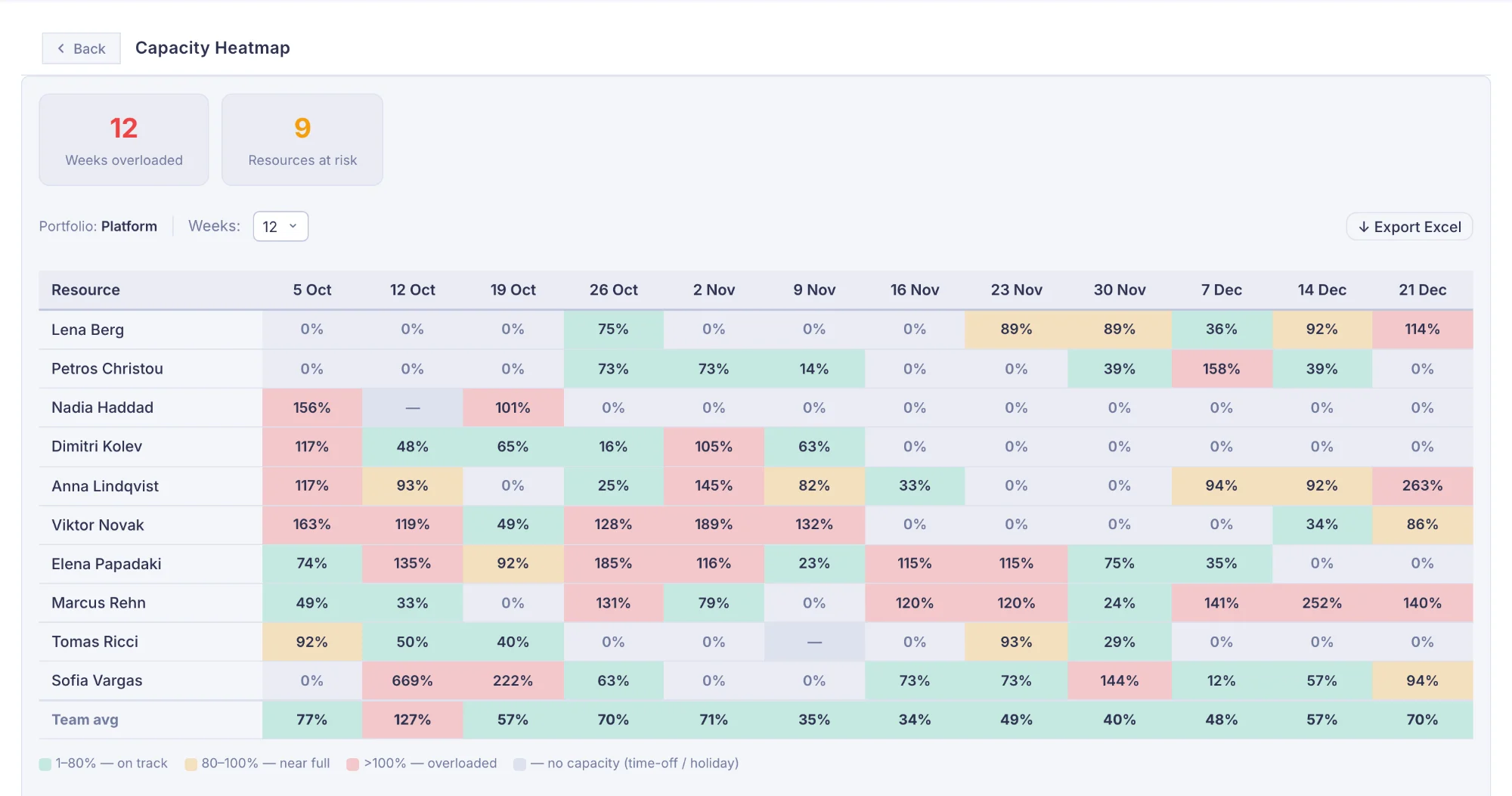
Capacity Heatmap
Week-by-week utilisation grid per resource. Colour-coded green/amber/red. Click a cell to see contributing tasks.
Utilisation Trend
Month-by-month capacity, planned, and actual hours. Three parallel bars per month show the full picture.
Actuals & Worklogs
Hours by Resource
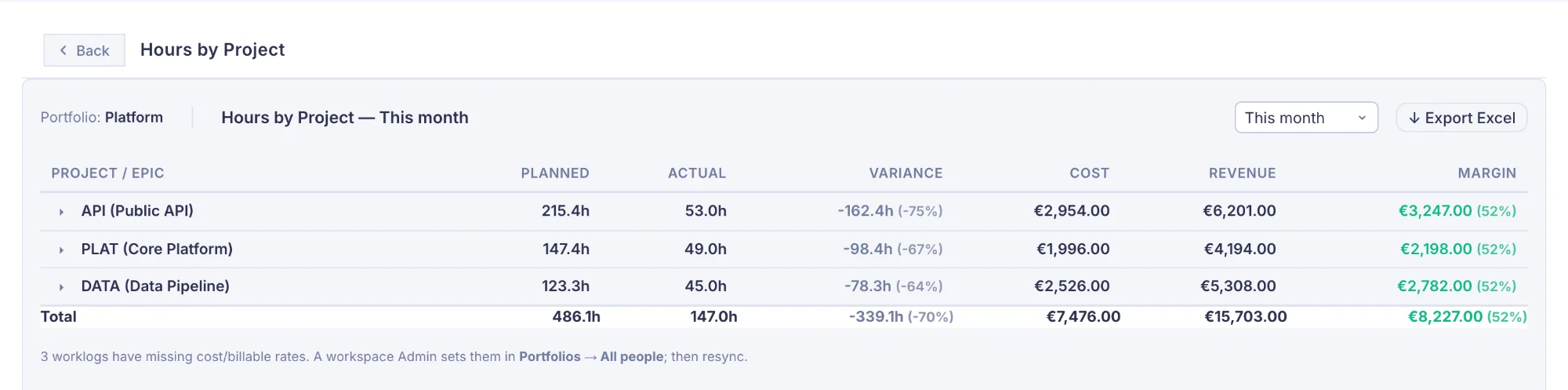
Actual hours per person with project and epic breakdown, plus Cost, Revenue, and Margin per resource using frozen T&M rates from the moment each worklog was synced. Two-sheet Excel export.
Hours by Project
Planned, actual, and variance hours per project alongside Cost, Revenue, and Margin. The primary T&M invoice driver — rates snapshotted at sync time so historical invoices never shift.
Detailed Resource Worklogs
Every worklog entry with resource, date, issue, project, epic, hours, Cost, and Revenue. Pivot by resource / project / issue for invoice line items. Margin totals per group + grand total.
Data Quality
Scheduled Without Effort
Scheduled tasks with no effort estimate. Fix these first — they skew capacity and burn rate calculations.
Unscheduled Backlog
Backlog items that haven't been placed on the calendar. Track what's waiting to be planned.
Sync Status
Per-project sync timestamps, worklog sync status, and all dirty tasks pending a Jira push.
Outside-Team Contributors
Worklogs logged to your portfolio's projects by people not on the team. Catches loaned engineers, misdirected time, and unmapped Jira users.
Actual hours from Jira — planned vs real, by project and resource.
Mermix pulls Jira worklogs using an incremental delta sync — only fetching entries added since the last run. Actual hours feed directly into planned vs actual comparisons, utilisation trends and project profitability. No spreadsheet, no estimation, no manual calculation.
Delta-based sync with cursor tracking
A cursor token advances after each sync. Only worklogs added after the cursor are fetched on the next run, keeping syncs fast regardless of history length.
Epic resolution across all issue hierarchies
Worklogs are resolved to their correct Epic, even for multi-level hierarchies (Task → Story → Epic). Only time logged on the projects you plan is kept.
Export everything to Excel
Every worklog report — by resource, by project, by issue, or full detail — exports as a formatted multi-sheet Excel file. Ready for finance reviews and sprint retrospectives.
One tool. Multiple teams. Full picture.
Portfolios let you scope the planning workspace by delivery team or business unit. Each portfolio has its own projects, resources, and planners — while admin users see everything and a cross-portfolio capacity overlay keeps shared resources visible across the whole organisation.
Scoped workspaces per team
Each portfolio defines its own set of Jira projects, team members, and planner users. Switching portfolios reloads the calendar with only that team's data — no noise from other teams.
Cross-portfolio capacity overlay
Resources shared across teams show their allocations from all portfolios as a thin purple line on their row — so you can spot conflicts and commitments without leaving your team's view.
Issue types per project
Each portfolio handles its own issue types of each Jira project, so two teams can share a project: one takes its bugs, the other its stories. An Admin can move an issue type from one portfolio to another.
Archived projects — data preserved
Archive completed projects to remove them from active planning. Their allocations, worklogs, and reports remain fully intact — always available for retrospectives and audits.